Pickily is an app that delivers fresh fruits and vegetables directly from the farm to your home.
About
Business



Our goal at Pickily is to provide convenient, reliable, and timely delivery of the freshest fruits and vegetables directly from local farms to your doorstep.
Business
Objective
Project
Objective
UX Design
Process
Project
Scope
My
Role
Objective
To develop and enhance Pickily's platform to ensure the seamless, reliable, and timely delivery of fresh fruits and vegetables directly from local farms to customers' doorsteps.
Deliverables
App with integrated features
Established logistics and order management systems.
Convenient Delivery
Quality Products
Constrains
Quality control issues
Delivery Delays
Product availability
logistic challenges
Platform
Android
Stakeholders
Project Mangers
UX/UI Team
Development Team
Marketing Team
Customer support
Delivery Partners

Objective from Business point
More conversion rate
Logistic problems
Delivering Quality products on time
Delivery charges
Delivery partners availability
Products quantity
Objective from My point (Ux Designer)
How to navigate the users
How to make users to understand the new feature incorporated
what if users did not understand the new features incorporated
What could be the loss if users are not able to understand the new logistic methods
probability to understand the conversion rate
User Research
User persona
User journey
User flow
Wireframing
Visual Design
Prototyping
Discover
Define
Ideate
Wireframe
Final Approach & Design
Test
Multiple Meeting with Stakeholders to understand the target audience and goal
Step 1 - Discover
Understanding the user
Step 2 - Define
Brainstorm Session to Identify Solutions for Meeting User Needs in the App
Step 3 - Ideate and find Solution
User Persona
User Journey Map
Attendance
John - VP
Arthi - Product Manager
Vigneshwaran - Ux Designer
Abdul - Logistics Manager
Usha - Customer Service Manager
Kanika - Marketing Manager
Agenda:
Introduction and Overview
Identification of Delivery Issues
Proposed Solutions
Action Plan and Next Steps
Q&A Session
Identification of Delivery Issues
Delay Due to traffic and road conditions
Less Delivery agents
Order Management issues
Issues on quantity of stalk
Ware house is far away from the city
Proposed Actions:
Deliver Within 4Km Radius from the store location
Implement a comprehensive training program for all delivery personnel
Evaluate and potentially switch third-party delivery service providers
Improve Packaging for quick order delivery
Delivery products within the 4km to 5km range from the store was the business solution to achieve 30 mins delivery,
Implement the provided solution in the existing application
My Support to the business on the solution
Launch a marketing campaign to communicate these changes to customers.
Understand the user and the flow is perfect.
Incorporate the delivery option with proper navigation.
Ensure the new pages follow the existing design system.
Make sure usability and accessibility is available to all.

Who are the users
People, who are working, house wife, bachelors and couples
Users
age group
25-65 years old
Platforms
Mobile
Web
News paper
Magazines
Vinyl Banners

Type of Users
Addressing both old and new users about the new feature added to the existing application.

Priyan, the Creative Head in Bangalore, starts his day with a jog in Cubbon Park, drawing inspiration from the city's vibrant energy. After a healthy breakfast, he heads to his trendy office, where he brainstorms with his team and infuses projects with fresh ideas. Lunchtimes are spent at local cafés, sketching concepts while checking grocery delivery updates on his app. Afternoons are filled with client meetings and presentations. Despite a busy schedule, Priyan mentors junior team members over coffee breaks. In the evening, he reviews the day's work before heading home, where he unwinds by exploring Bangalore's food scene and reading design magazines.

Priyan
Creative Head
About
Demograhics
Age -30
City - Bangalore
Salaried - Yes
Marital Status - Single
Primary Goals:
Quality Products on time
Reasonable price
Flexible time
Pain points
Delivery is taking more the 20 hours
Delivery time is not convenient
Products Quality is not 100%
Due to unclear delivery times, users need to be available at all times
Education Level: M.Sc Design
Language: Kanada, Hindi, English
Technology Proficiency: High
Goals and Pain points
Bio
Phase
Frequent User
Browse Products
Buy Products
Delivery Option
Complete Shopping
Action
In this phase, the regular user accesses the app after logging in and begins actively utilizing its features and functionalities.
During this phase, the user engages with the grocery delivery app by browsing for products they need and adding them to their virtual shopping cart.
Once the user has selected the desired products and specified their quantities, they proceed to purchase by transitioning the selected items from their shopping list to the checkout process.
During this phase, the user carefully reviews the selected items and quantities, confirms the delivery timeline provided, and proceeds to enter payment details, including credit card information or digital wallet, to finalize the purchase.
This phase completes the transaction process, and the user awaits the delivery of their groceries.
Tochpoints
Login screen
Home Page
Banners
Product Categories
Search bar
add to cart buttons
Proceed or cancel Buttons
Checkout Button
Make payment Button
Done Button
Opputunities
Provide delivery notifications on the home screen
-
Delivery Options can be included
30 mins delivery Notification
-
Emotion
😀
🤔
🙂
🧐
😀
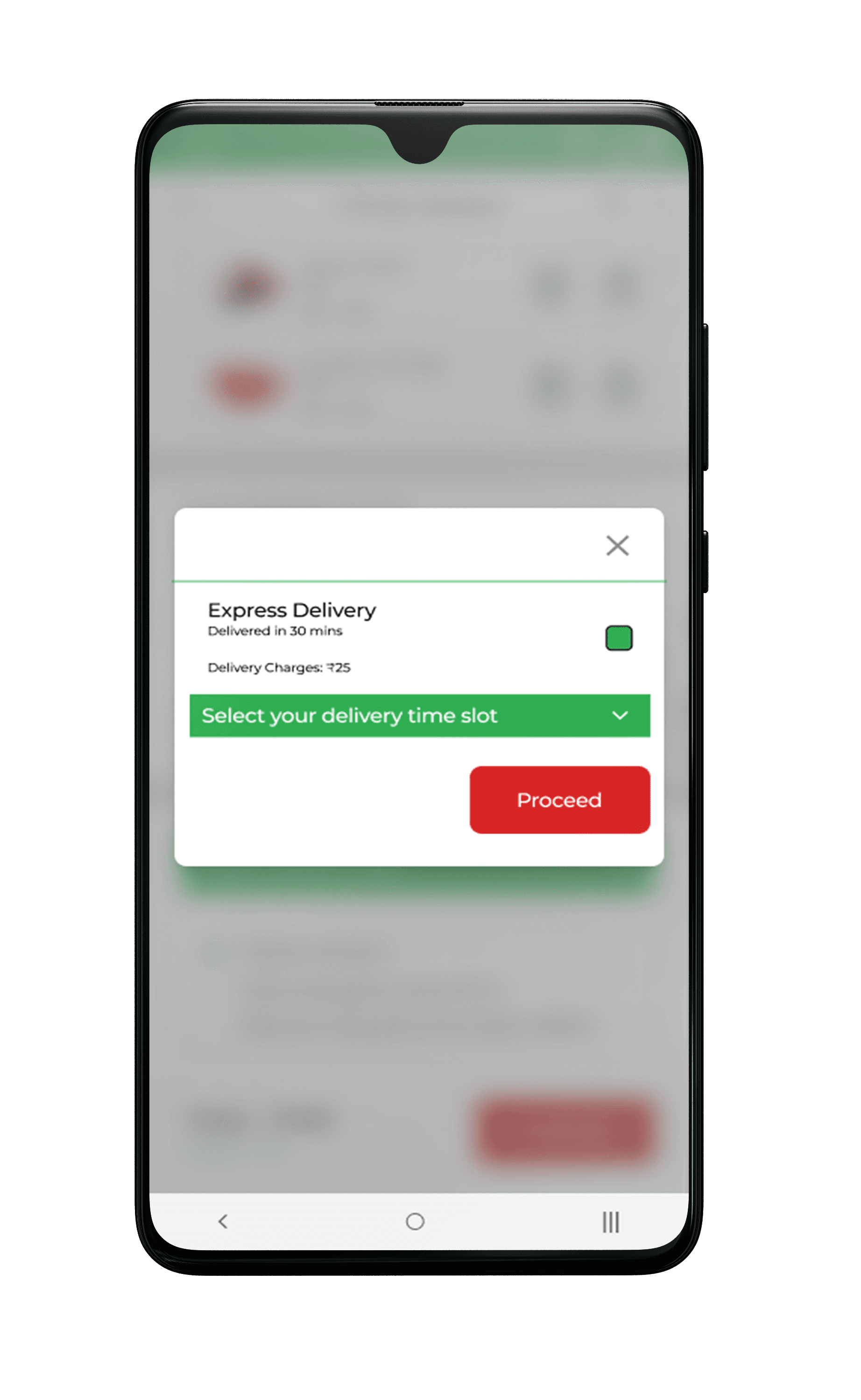
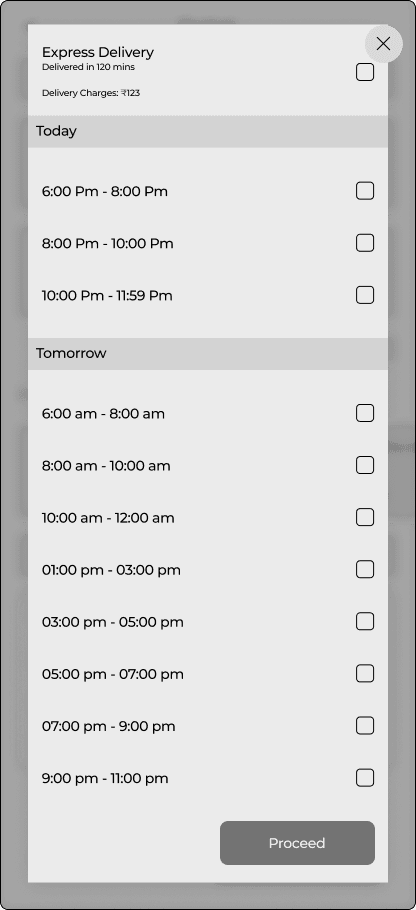
Express Delivery Slots:
Express Delivery Slots:
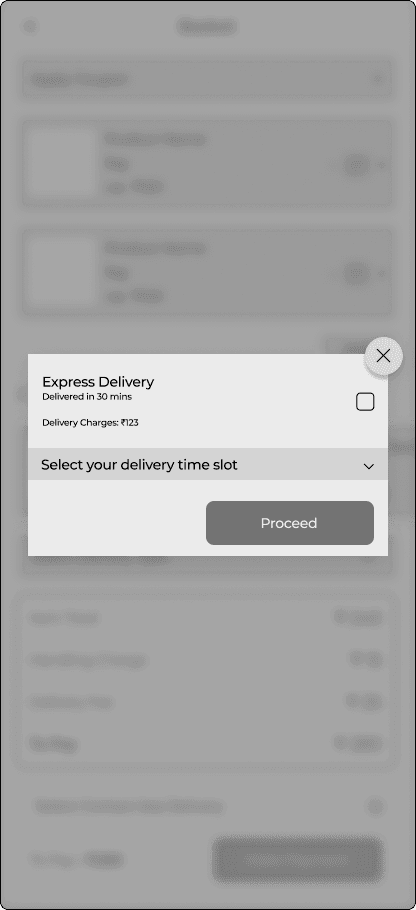
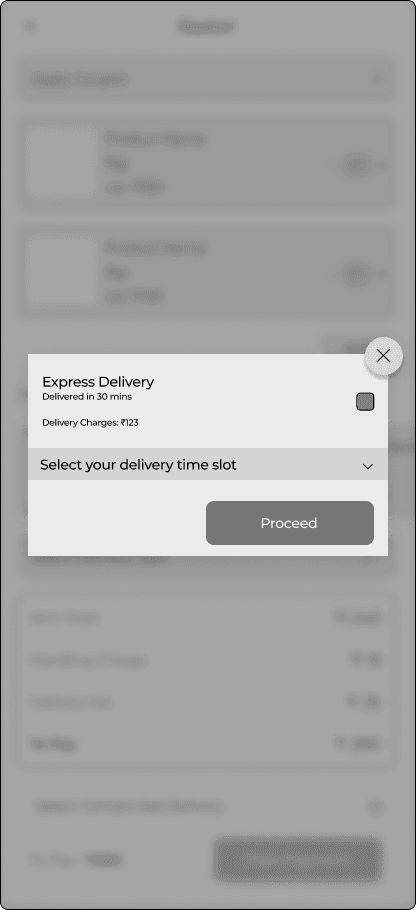
Priority Delivery: Introduce a priority delivery option where customers can pay an additional fee for guaranteed 30-minute delivery. This service could be available during peak hours or for specific high-demand items.
Priority Delivery: Introduce a priority delivery option where customers can pay an additional fee for guaranteed 30-minute delivery. This service could be available during peak hours or for specific high-demand items.
Neighborhood Hubs: Establish neighborhood hubs strategically located to ensure quick access to customers within a certain radius. Orders from nearby areas can be fulfilled within 30 minutes by dispatching delivery personnel from these hubs.
Neighborhood Hubs: Establish neighborhood hubs strategically located to ensure quick access to customers within a certain radius. Orders from nearby areas can be fulfilled within 30 minutes by dispatching delivery personnel from these hubs.
Neighborhood Hubs: Establish neighborhood hubs strategically located to ensure quick access to customers within a certain radius. Orders from nearby areas can be fulfilled within 30 minutes by dispatching delivery personnel from these hubs.
Neighborhood Hubs: Establish neighborhood hubs strategically located to ensure quick access to customers within a certain radius. Orders from nearby areas can be fulfilled within 30 minutes by dispatching delivery personnel from these hubs.
Priority Delivery: Introduce a priority delivery option where customers can pay an additional fee for guaranteed 30-minute delivery. This service could be available during peak hours or for specific high-demand items.
Priority Delivery: Introduce a priority delivery option where customers can pay an additional fee for guaranteed 30-minute delivery. This service could be available during peak hours or for specific high-demand items.
Express Delivery Slots:
Express Delivery Slots:
Express Delivery Slots:
Express Delivery Slots:
Express Delivery Slots:
Express Delivery Slots:
🧠
Introducing the express delivery option
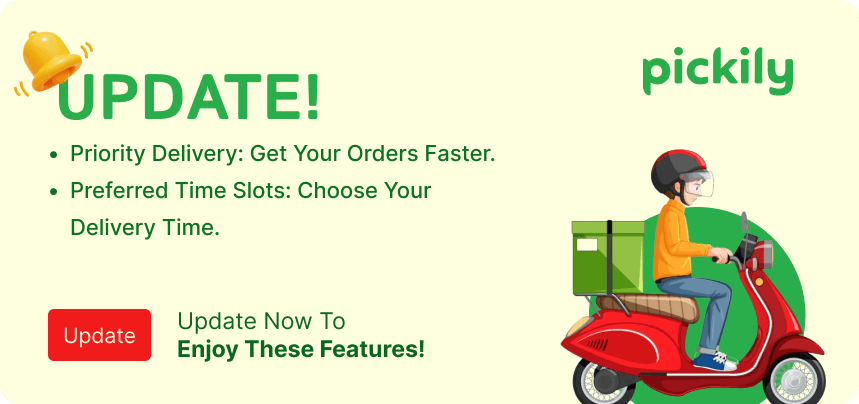
Prominently feature badges on the homepage to announce our 30-minute delivery service
Push notification can be sent regarding this 30-minute delivery service
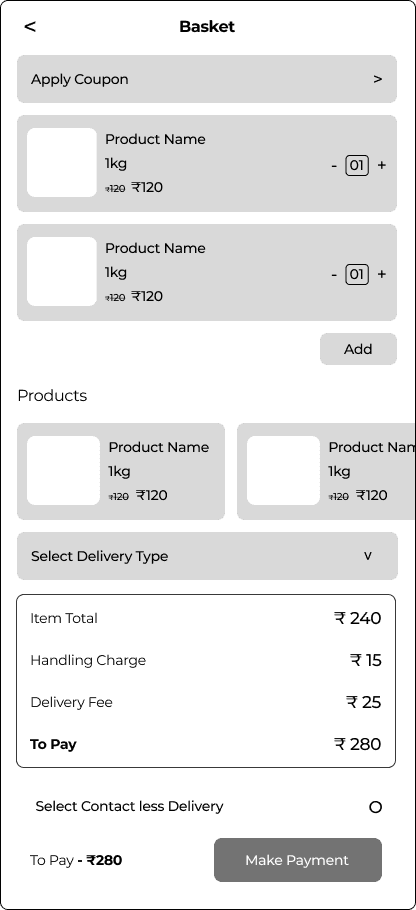
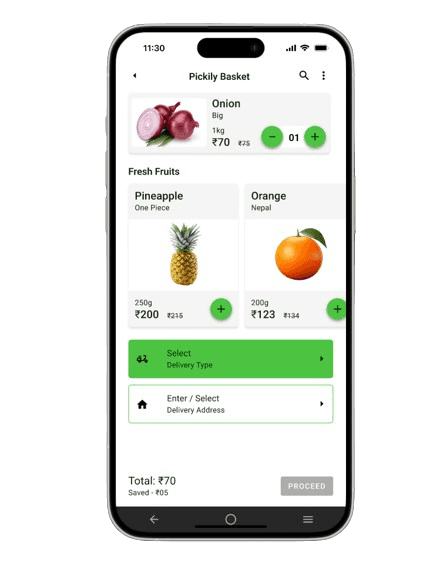
Introducing delivery options used in the app
Priority Delivery feature
Select the delivery slot feature
Solution
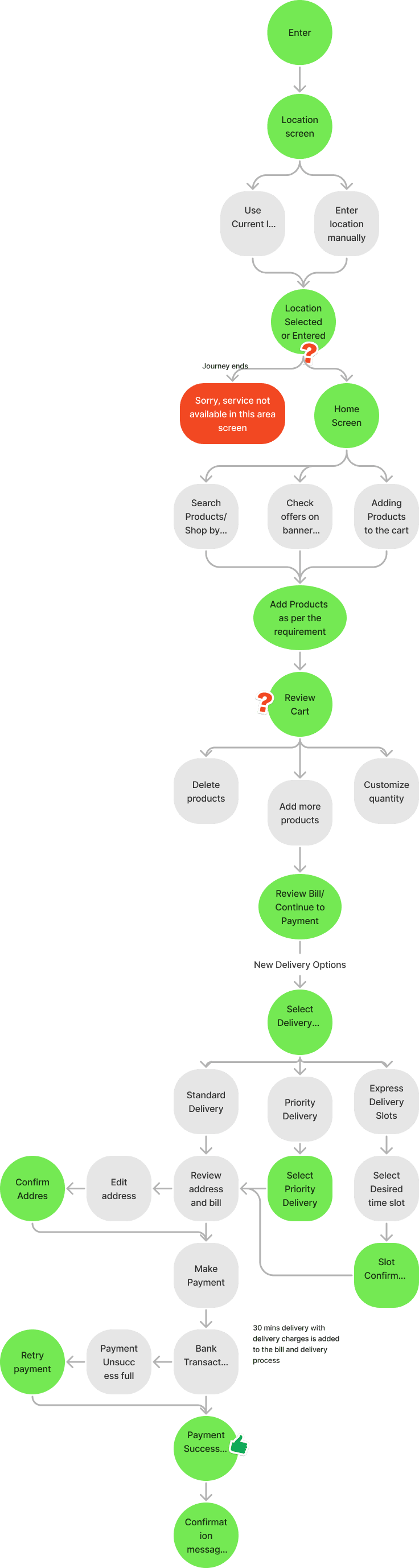
User Flow
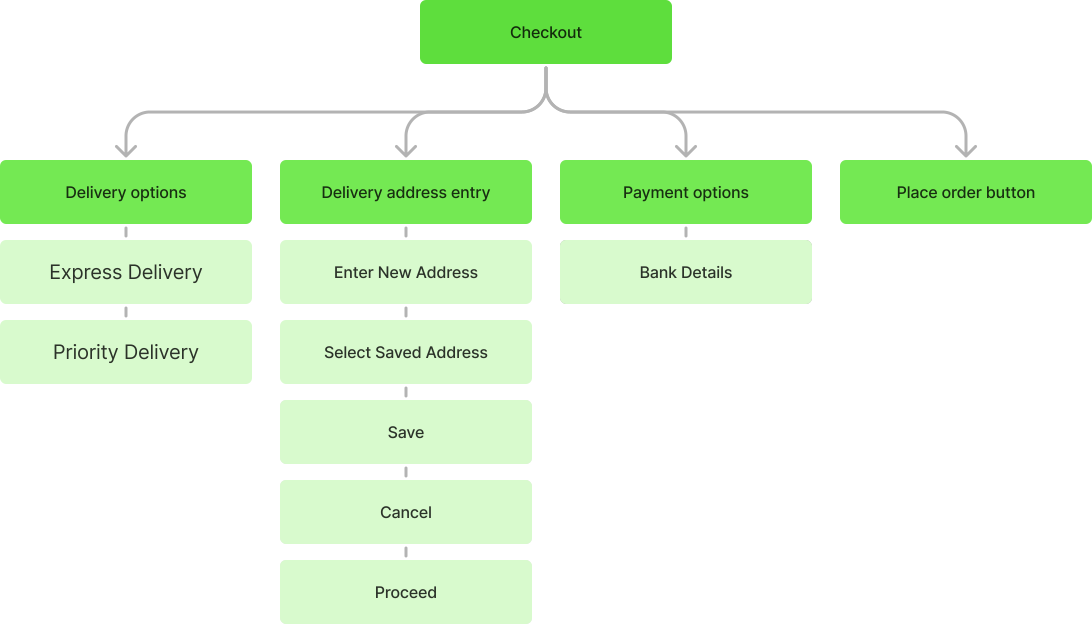
Information Architecture - This information architecture is only for the checkout section due to a recent update.
Creating multiple wireframes to explore possible outcomes
Step 4 - Wire Frame
Creating multiple wireframes to explore possible outcomes
Step 5 - Feedback &
Approved wireframe
With Approved wireframes final visuals and PN designs have been created
Step 6 - Final Approach & Design
Push
Notification
UI Visuals